
The Modern, Privacy-First
Desktop Workspace for SSH & Cloud.
Supercharge your infrastructure operations with pure Rust performance. Features GPU-accelerated terminal multiplexing, real-time OSC 7 linked directory tracking, self-hosted encrypted dataset sync, docked host monitoring plugins, dual-pane SFTP/SCP transfers, and universal session import — all sealed inside your native OS keychain.
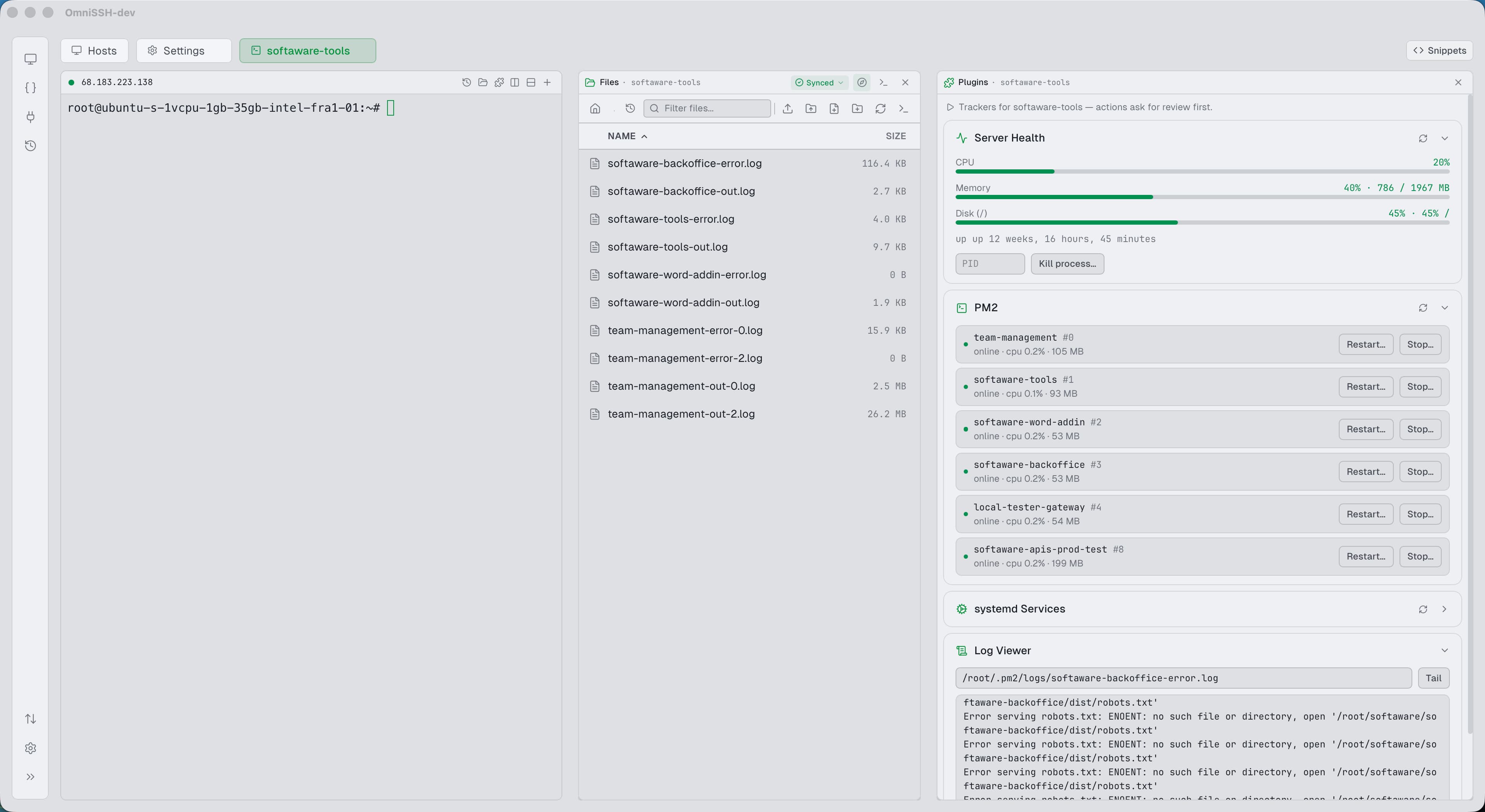
Try OmniSSH in Your Browser
Experience how the WebGL Terminal, OSC 7 Linked Explorer, and live Host Plugins Dock work in unison. Click folders, preview files, or execute commands.
Type 'help' or click directory folders / preset buttons below to test live features.
Engineered for Modern DevOps & Sysadmins
Every tool you need to manage remote servers, containers, filesystems, and cloud storage in a single, beautifully crafted native desktop app.
Self-Hosted Encrypted Dataset Synchronization
End-to-end encrypted sync over your own SSH servers with zero cloud dependency.
Keep hosts, groups, snippets, tunnels, S3 connections, host plugins, and app preferences perfectly synchronized across multiple machines. Unlike cloud-dependent terminal clients, OmniSSH publishes datasets as sealed AES-256-GCM containers directly to an SSH server you own. Key material never leaves your devices.
How OmniSSH Compares
See how OmniSSH stacks up against legacy terminal emulators and cloud-locked clients. Built with modern architecture, no proprietary paywalls, and total privacy.
| Feature / Capability | OmniSSH | Termius | WinSCP | MobaXterm | PuTTY | Cyberduck |
|---|---|---|---|---|---|---|
SSH Terminal Engine WebGL provides 60fps rendering without UI thread blocking. | Yes (WebGL GPU) | Yes | Yes (X11) | Yes | ||
Linked Terminal File Explorer Follows your shell 'cd' automatically in real time. | Yes (OSC 7 CWD Sync) | Yes | ||||
Host Monitoring Plugins Dock Docked alongside terminal with safe confirmation modals. | Yes (Docker, PM2, Health) | |||||
Dual-Pane Host File Manager Side-by-side tree browsing and keyboard shortcuts. | Yes (Local & Remote) | Yes | Yes | |||
Direct Server-to-Server Streaming Relays bytes directly between two servers without saving locally. | Yes (Zero Local Disk) | |||||
SFTP & SCP Multi-Tab Browser | ||||||
S3 Cloud Storage Browser Built-in presigned download URL generation. | Yes (AWS, MinIO, R2, B2) | Yes (AWS S3 only) | ||||
Split Panes (Across Different Hosts) OmniSSH allows splitting against separate hosts with broadcast input sync. | Yes (Multi-Host + Sync) | Yes (Single Host) | Yes | |||
Universal Connection Importer Decrypts local Termius LevelDB database 100% offline, with bulk password file imports. | Yes (OpenSSH, MobaXterm, Termius) | |||||
SSH Port Forwarding Rules | Yes (Presets) | |||||
Command Snippets & Variables | Yes ({{variable}} prompts) | Yes | Yes | |||
Cross-Platform Support | macOS, Windows, Linux | macOS, Windows, Linux | Windows only | Windows only | Windows only | macOS & Windows |
Zero Cloud, 100% Offline No account required, no remote servers, works air-gapped. | No (Cloud Sync) | |||||
Open Source License | Yes (MIT) | No (Proprietary) | Yes (GPL) | No (Freemium) | Yes (MIT) | Yes (GPL) |
Credential Storage Vault | Native OS Keychain | Cloud Account | Registry / Plain | INI / Registry | Windows Registry | OS Keychain |
Self-Hosted Encrypted Dataset Sync Zero-cloud E2E encrypted sync published to your own SSH/SFTP server. | Yes (Argon2id + AES-GCM) | Cloud Account Only | ||||
Dataset Rollback & Generation History Revert accidental changes safely by publishing a new rolled-back generation. | Yes (10 Generations) | |||||
Dataset-Managed Scoping & Field Locks Scope by all, groups, or specific hosts with read-only member protection. | Yes (Lock & Detach) |
Unlike Electron apps that consume gigabytes of memory, OmniSSH's Tauri v2 + Rust architecture uses ~45MB RAM with sub-second launch times.
Your server keys and configurations are never stored in third-party clouds or synced to external servers. Zero telemetry, zero tracking.
Licensed under MIT. No premium subscriptions, no artificial connection limits, and no crippled trial tiers.
Pure Rust & Tauri v2 Architecture
A strict separation between a fast, memory-safe Rust backend and a reactive TypeScript / React user interface with typed IPC events.
React 19 & TypeScript Frontend
Rust Backend (Tauri v2 Core)
russh with asynchronous PTY allocation and multi-channel multiplexing.russh-sftp with stream relay for direct server-to-server transfers.rust-s3 on Tokio runtime.rusqlite with atomic transactions and rollback safety.Your Infrastructure. Zero Cloud Leaks.
Most modern terminal apps want you to create an account and sync your SSH keys to their proprietary servers. OmniSSH takes the opposite approach: zero accounts, zero cloud intermediaries, and self-hosted end-to-end encrypted dataset sync on servers you control.
Native OS Keychain Storage
Credentials, private keys, and passphrases are stored strictly in your operating system's native secure vault: Apple Keychain (macOS), Windows Credential Manager (Win32), and Linux Kernel Session Keyring (keyutils).
Self-Hosted Encrypted Sync
Publish datasets to an SSH server you control. Sealed client-side with AES-256-GCM encryption, keyed via Argon2id from a per-dataset passphrase, and signed by an ed25519 owner key. Remote server operators cannot inspect your hosts.
Encrypted App Vault (AES-256-GCM)
Prefer an isolated password store? Enable the App Vault with master-password protection using AES-256-GCM encryption and Argon2id key derivation. Passwords can be temporarily revealed with an eye toggle only after master verification.
Absolute Zero Telemetry
No analytics. No crash report telemetry pings. No usage counters. No remote user accounts. OmniSSH does not contain a single outbound analytics script or third-party tracking pixel.
RAM Zeroization & Memory Safety
Sensitive plaintext keys and secrets are explicitly zeroized in memory immediately following the SSH authentication handshake, preventing memory inspection attacks and core dump leaks.
Verified Action Invariant
State-changing actions initiated from the Host Plugins Dock (Docker stop, PM2 restart, pod deletion) prompt a strict verification modal showing the exact interpolated command string before execution.
What's New in OmniSSH
Actively developed with rapid enhancements, rock-solid stability, and community-driven features.
Dataset Sync Clarity
Download OmniSSH
Free, open-source, and natively compiled for macOS, Windows, and Linux. No account or signup required.
macOS
Native universal binaries for Apple Silicon (M1/M2/M3/M4) and Intel processors.
If macOS blocks first launch, run:
Windows
Fast, self-contained Windows installers with native Credential Manager integration.
Integrates with Windows DPAPI and Credential Manager for encrypted local storage.
Linux
Universal AppImage or Debian/Ubuntu deb packages with Linux Kernel Session Keyring (keyutils).
Backed by the Linux Kernel Session Keyring (keyutils) for direct kernel credential storage without desktop daemon dependencies.
Support OmniSSH Development
OmniSSH is 100% free, MIT open-source, and privacy-first with zero telemetry. Your sponsorship helps keep development active, funds cross-platform build infrastructure, and keeps desktop SSH and SFTP workflows independent and modern.
GitHub Sponsors
Monthly or one-time sponsor tiers
Back ongoing development directly through GitHub Sponsors. Tiers include sponsor badges, priority bug triage, and direct input on future roadmap milestones.
Buy Me a Coffee
Quick tip & one-off support
Fuel late-night Rust optimizations, new host plugins, and release maintenance. A coffee goes a long way in supporting independent open-source tools.
No recurring commitment needed. Support lefos13 with single-click payment via card, Apple Pay, or Google Pay.
Got Questions? We Have Answers.
Technical details on protocols, privacy guarantees, and open-source foundations.